 Stephan Lo
3239cfbc62
Stephan Lo
3239cfbc62
Renamed resources/likec4 to resources/edp-likec4 to better reflect that this directory contains the Enterprise Developer Platform architecture models, not documentation platform architecture. Extended element kinds in edp-likec4/models/spec.c4 to support documentation platform modeling: - Added person, tool, process, repository element kinds - These allow modeling of documentation workflows and processes Consolidated webcomponent generation: - Combined both architecture projects (edp-likec4 and doc-likec4) into a single webcomponent output at static/js/likec4-webcomponent.js - Updated Taskfile.yml to generate from edp-likec4 directory - Removed duplicate webcomponent script loading in head-end.html - Fixed CustomElementRegistry duplicate registration issue Embedded TeleNeoOffice corporate fonts: - Added font files to static/fonts/ and static/ root - Required for correct rendering of diagrams in webcomponent - Fonts are embedded in webcomponent but also served from Hugo static paths - Fixed 404 errors for font loading Updated architecture documentation: - Fixed markdown linting issues (trailing spaces, fence spacing) - Updated all references from resources/likec4 to resources/edp-likec4 - Enhanced setup.md with correct directory structure This refactoring enables: 1. Clear separation between EDP architecture and documentation platform models 2. Single consolidated webcomponent containing all architecture views 3. Proper font loading for corporate branding in diagrams 4. Foundation for future architecture documentation expansion Breaking changes: None (paths updated in documentation) |
||
|---|---|---|
| .devcontainer | ||
| .github/workflows | ||
| .vscode | ||
| assets | ||
| content/en | ||
| layouts | ||
| resources | ||
| scripts | ||
| static | ||
| .dockerignore | ||
| .env.versions | ||
| .gitignore | ||
| .gitmodules | ||
| .htmltest.yml | ||
| .htmlvalidate.json | ||
| .markdownlint.json | ||
| config.yaml | ||
| devbox.json | ||
| devbox.lock | ||
| DOCKER.md | ||
| Dockerfile | ||
| edgeconnectdeployment.yaml | ||
| go.mod | ||
| go.sum | ||
| hugo.toml | ||
| k8s-deployment.yaml | ||
| LIKEC4-QUICKSTART.md | ||
| package-lock.json | ||
| package.json | ||
| README-developer.md | ||
| README.md | ||
| RELEASE.md | ||
| Taskfile.yml | ||
| TESTING.md | ||
| VERSIONS.md | ||
IPCEICIS-DeveloperFramework Documentation
This repo contains business and architectural design and documentation of the DeveloperFramework subproject of IPCEI-CIS.
How to read and contribute to this documentation locally
The documentation is done in Hugo-format.
Hugo is a static site renderer - so to get the documentation site presented you need a running Hugo processor. Therefore there is
- either a Hugo
.devcontainer-definition - just run a devcontainer aware IDE or CLI, e.g. Visual Studio code - or a Hugo
Devbox-definition - in this case just run a devbox shell
Local installation of the Hugo documentation system
We describe two possible ways (one with devcontainer, one with devbox) to get the Hugo-documentation system locally running.
For both prepare the following three steps:
- open a terminal on your local box
- clone this repo:
git clone https://forgejo.edf-bootstrap.cx.fg1.ffm.osc.live/DevFW/website-and-documentation - change to the repo working dir:
cd website-and-documentation
Possibility 1: Hugo in a devcontainer
devcontainers are running containers as virtual systems on your local box. The defintion is in the .devcontainer folder.
Thus as preliminary you need a container daemon running, e.g. Docker.
There are several options to create and run the devcontainer - we present here two:
Option 1: Run the container triggered by and connected to an IDE, e.g. VS Code
- open the repo in an Devcontainer-aware tool/IDE (e.g.
code .) - start the
devcontainer(in VSC it'sF1 + Reopen in Devcontainer) - when the container is up & running just open your browser with
http://localhost:1313/
Option 2: Run the container natively
An alternative to get the container image is the devcontainer CLI, then you can run the devcontainer without VS Code. Thus as preliminary you need to do the install steps of the devconatiner cli.
- start the devcontainer by running:
devcontainer up --workspace-folder . - find out the IP address of the devconatiner by using
docker psanddocker inspect <id of container> - when the container is up & running just open your browser with
http://<DOCKER IP>:1313/
Possibility 2: Hugo in a devbox
Devboxes are locally isolated environments, managed by the Nix package manager. So first prepare the devbox.
Then
devbox shell- In the shell:
hugo serve
Editing
Documentation language
The documentation is done in Docsy-Theme.
So for editing content just goto the content-folder and edit content arrording to the Docsy documentation
Commiting
After having finished a unit of work commit and push.
Annex
Installation steps illustrated
When you run the above installation, the outputs could typically look like this:
In Visual Studio Code
Reopen in Container
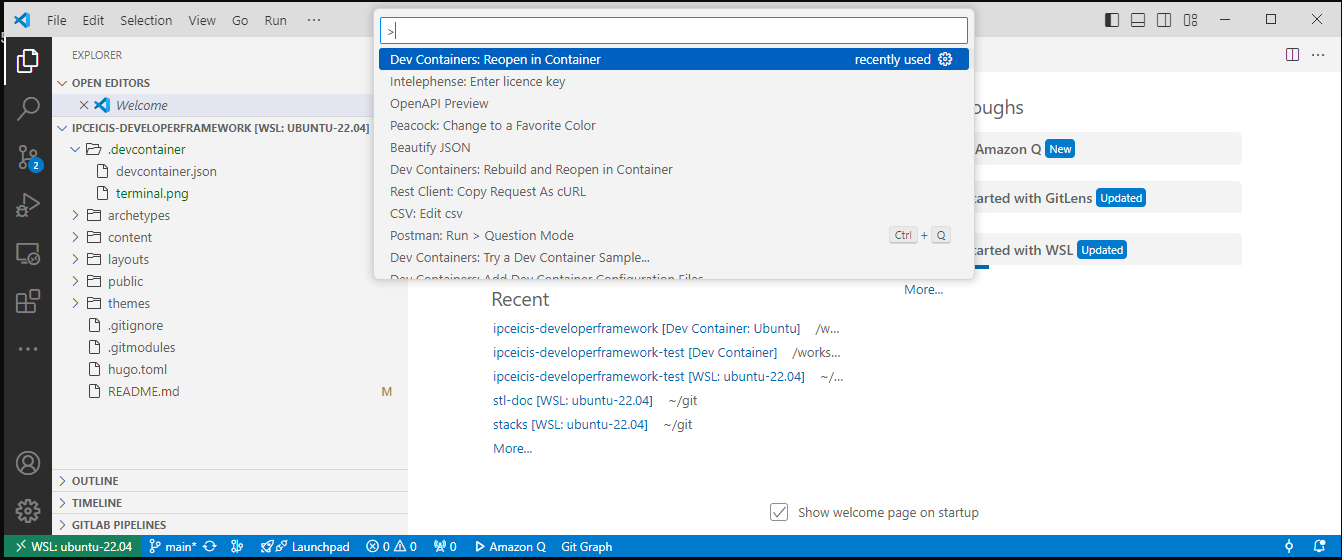
Hugo server is running and (typically) listens to localhost:1313
After some installation time you have:
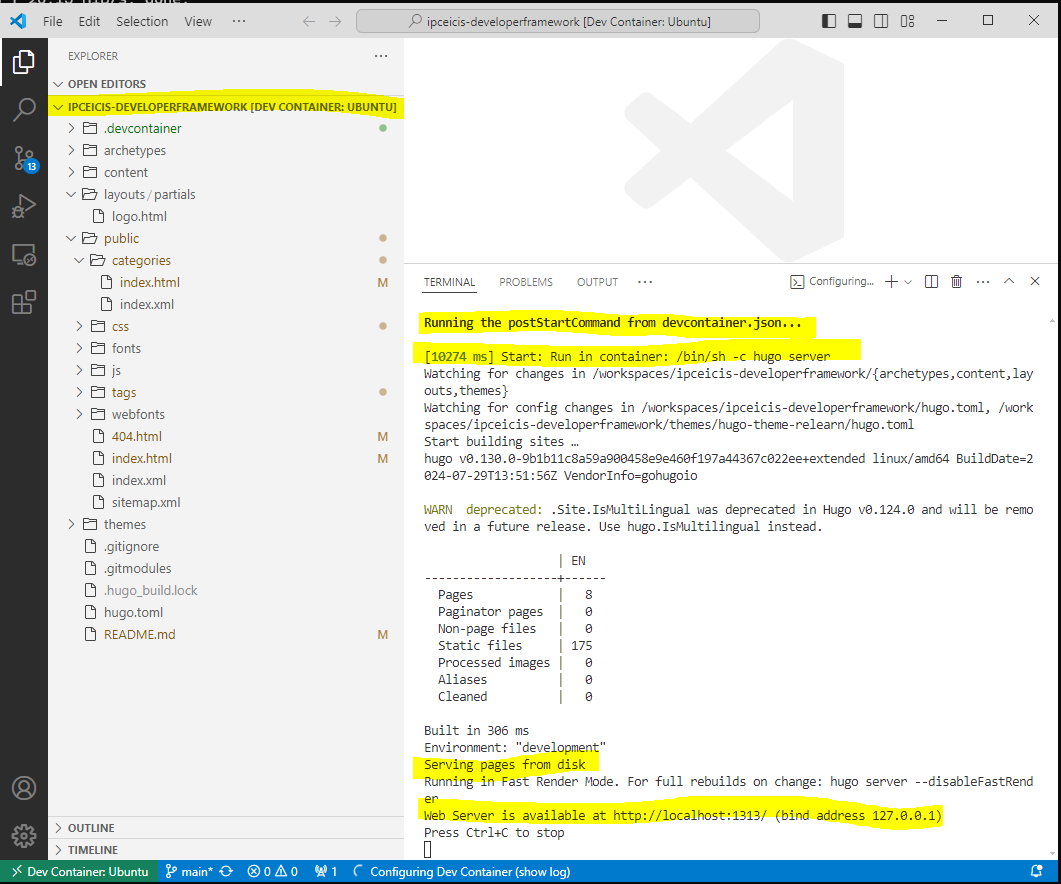
Final result in a web browser
